
Driving license verification plays an essential role in confirming a person’s identity and ensuring that the documents presented are legitimate. Whether you’re an employer, car rental company, financial institution, security professional, or business owner, verifying a driver’s license correctly can protect your organization from fraud, identity theft, and compliance issues.
Unfortunately, many people make simple verification mistakes that can lead to accepting fake or altered licenses. Criminals continue to improve their techniques, making counterfeit identification documents increasingly convincing. Understanding the most common mistakes can help you strengthen your verification process and reduce unnecessary risks.
In this guide, we’ll explore the biggest driving license verification mistakes and explain how to avoid them.
Why Driving License Verification Matters
A driver’s license is more than just permission to drive. It is widely used as an official form of identification for:
- Identity verification
- Age verification
- Employment screening
- Vehicle rentals
- Banking services
- Hotel check-ins
- Government services
- Access control
Accepting a fake or improperly verified license can result in financial losses, legal penalties, fraud, and reputational damage.
Only Looking at the Front of the License
One of the most common verification mistakes is checking only the front side of the license.
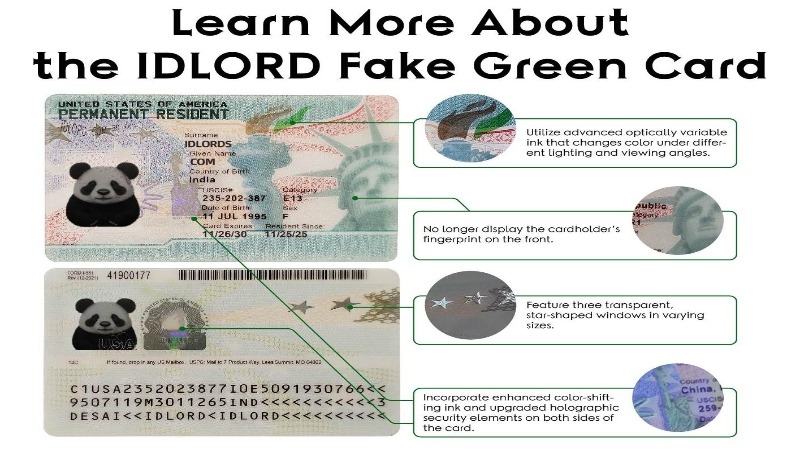
Modern driver’s licenses contain numerous security features on both sides, including:
- Barcodes
- QR codes
- Magnetic stripes
- Fine print
- Microtext
- Holograms
- Ghost images
Ignoring the back of the license means missing valuable verification information.
Best Practice:
Always inspect both the front and back of every driver’s license before accepting it.
Ignoring Security Features
Many businesses simply compare the photo without checking the built-in security elements.
Legitimate licenses include several anti-counterfeit features, such as:
- UV printing
- Laser engraving
- Raised text
- Optical variable ink
- Transparent windows
- Security backgrounds
- Guilloche patterns
Counterfeit licenses often imitate these features but fail under close inspection.
Always examine multiple security elements rather than relying on a single feature.
Failing to Compare the Photo Properly
Some staff members glance quickly at the photograph instead of carefully comparing facial characteristics.
Instead of focusing only on hairstyles or facial hair, compare:
- Eye shape
- Nose
- Chin
- Jawline
- Ear position
- Face proportions
People naturally change hairstyles, wear glasses, or grow beards, but facial structure remains relatively consistent.
Overlooking Expiration Dates
A valid-looking driver’s license may still be expired.
Using an expired identification document can create compliance issues depending on local regulations.
Before accepting a license, verify:
- Issue date
- Expiration date
- Renewal status
- License class
Expired licenses should always receive additional attention according to company policy.
Not Scanning the Barcode
Many modern driver’s licenses contain PDF417 barcodes that store encoded information.
Some organizations never scan these barcodes.
Barcode verification helps compare encoded data with printed information, revealing possible alterations.
When available, use professional ID scanners to verify:
- Name
- Date of birth
- Address
- License number
- Expiration date
If barcode information differs from printed text, further investigation is necessary.
Ignoring Signs of Physical Tampering
Fraudsters often modify genuine licenses by changing personal information.
Look carefully for:
- Peeling laminate
- Air bubbles
- Uneven edges
- Glue residue
- Scratches
- Damaged corners
- Misaligned printing
Even small signs of tampering may indicate document alteration.
Relying Only on Human Judgment
Human inspection remains important, but should not be the only verification method.
Fatigue, poor lighting, distractions, and limited training increase the chances of mistakes.
Combining manual inspection with technology provides much stronger protection.
Businesses increasingly use:
- ID scanners
- Authentication software
- UV inspection tools
- Digital verification systems
These tools reduce human error while improving accuracy.
Not Training Employees Regularly
Verification procedures change as license designs evolve.
Without ongoing training, employees may struggle to identify newer security features or updated document formats.
Regular staff training should include:
- New license designs
- Updated security features
- Fraud detection techniques
- Common counterfeit indicators
- Company verification procedures
Well-trained employees are your first line of defense against document fraud.
Ignoring State or Country Differences
Driver’s licenses vary significantly between jurisdictions.
Each state or country uses different:
- Colors
- Layouts
- Fonts
- Holograms
- Security features
- Barcode formats
Assuming every license should look the same often leads to incorrect verification decisions.
Become familiar with licenses commonly presented in your area and maintain updated reference materials.
Accepting Poor Quality Documents Without Questions
A damaged license isn’t automatically fake, but excessive wear can hide important security features.
If essential details cannot be verified due to damage, request additional identification or follow your organization’s verification procedures.
Never guess when important information is unreadable.
Rushing the Verification Process
Speed is often prioritized over accuracy, especially during busy business hours. However, rushing through a driving license verification increases the risk of accepting counterfeit or altered IDs.
Taking just a few extra seconds to inspect the document carefully can prevent costly mistakes. A systematic verification process ensures every license is checked consistently.
Tips to Avoid This Mistake:
- Follow a standardized verification checklist.
- Verify every security feature in the same order.
- Never skip steps because the customer appears trustworthy.
- Encourage staff to prioritize accuracy over speed.
Trusting Familiar Customers Without Verification
Some businesses stop checking identification for repeat customers. While familiarity builds trust, it should never replace proper verification procedures.
Identity theft can involve stolen or borrowed licenses, and even regular customers may unknowingly present compromised documents.
Best Practice:
Verify identification according to company policy every time it is required, regardless of how well you know the customer.
Failing to Check for Signs of Counterfeit Printing
Counterfeit licenses often reveal subtle printing flaws that are easy to miss during a quick inspection.
Watch for:
- Blurry text
- Uneven font sizes
- Incorrect spacing
- Pixelated images
- Poor color quality
- Misaligned graphics
- Smudged ink
Authentic driver’s licenses are manufactured using high-quality printing techniques that produce sharp, consistent details.
Ignoring UV and Light-Based Security Features
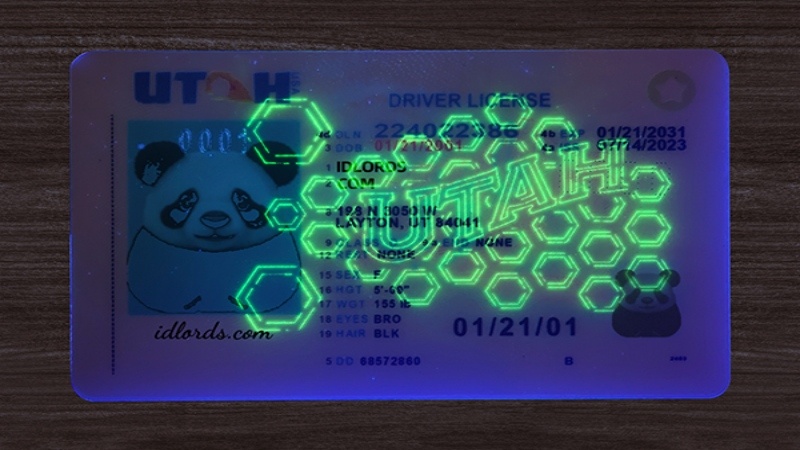
Many official driver’s licenses contain hidden security features that are only visible under ultraviolet (UV) light.
Businesses that never use UV inspection tools miss an important layer of authentication.
Common UV security elements include:
- Hidden state symbols
- Fluorescent patterns
- Invisible text
- Security fibers
- Special logos
A simple UV flashlight can significantly improve document verification accuracy.
Not Keeping Up with New License Designs
Government agencies periodically redesign driver’s licenses to improve security and combat counterfeiting.
Using outdated reference materials can result in rejecting legitimate licenses or accepting counterfeit ones.
Stay informed by:
- Reviewing official licensing authority updates.
- Updating verification guides regularly.
- Training staff whenever new designs are introduced.
- Replacing outdated verification manuals.
Keeping current helps ensure accurate verification.
Best Practices for Accurate Driving License Verification
Avoiding mistakes starts with implementing a clear and consistent verification process.
Here are several best practices:
Inspect the Entire License
Always examine both the front and back of the document.
Verify Multiple Security Features
Never rely on only one security feature. Compare several authentication elements.
Use Technology
Professional ID scanners and verification software can quickly identify inconsistencies that are difficult to detect manually.
Train Employees Frequently
Regular training helps staff recognize counterfeit documents and understand new security updates.
Maintain Updated Reference Materials
Use current examples of legitimate driver’s licenses from different states or countries.
Document Suspicious Cases
If a license appears altered or fraudulent, follow company procedures for documenting and reporting the incident.
Benefits of Proper Driving License Verification
A strong verification process offers numerous advantages:
- Reduces identity fraud
- Protects business reputation
- Improves regulatory compliance
- Prevents financial losses
- Enhances customer security
- Reduces human error
- Increases employee confidence
- Supports safer business operations
Investing in proper verification procedures ultimately saves both time and money.
FAQs
Why is driving license verification important?
Driving license verification helps confirm a person’s identity, prevents fraud, and ensures businesses comply with legal and security requirements.
What is the most common verification mistake?
The most common mistake is relying only on the photo without checking other security features such as holograms, barcodes, UV markings, and expiration dates.
Can fake driver’s licenses have working barcodes?
Yes. Some counterfeit licenses contain barcodes that appear functional. However, professional verification tools can often detect inconsistencies between the encoded information and the printed details.
Should businesses use ID scanners?
Yes. ID scanners improve verification accuracy, reduce human error, and help detect counterfeit or altered licenses more efficiently.
How often should employees receive verification training?
Employee training should be updated regularly, especially whenever new driver’s license designs or security features are introduced.
Is checking only the expiration date enough?
No. The expiration date is only one part of the verification process. Businesses should also inspect security features, document quality, photographs, and encoded information.
Conclusion
Driving license verification is a critical step in protecting businesses, organizations, and individuals from fraud and identity theft. While counterfeit documents continue to become more sophisticated, many verification failures occur because of simple, avoidable mistakes. By slowing down the verification process, examining all security features, using modern verification technology, and providing ongoing employee training, businesses can significantly reduce the risk of accepting fraudulent licenses.
Establishing a standardized verification procedure not only improves accuracy but also enhances customer trust, strengthens regulatory compliance, and minimizes financial and legal risks. Whether you verify licenses occasionally or as part of your daily operations, following these best practices will help ensure every identification check is thorough, reliable, and secure.
